 >
>
Your iPhone has one port. Here's nine things it can do.
Most people use it to charge their phone. That's a shame.
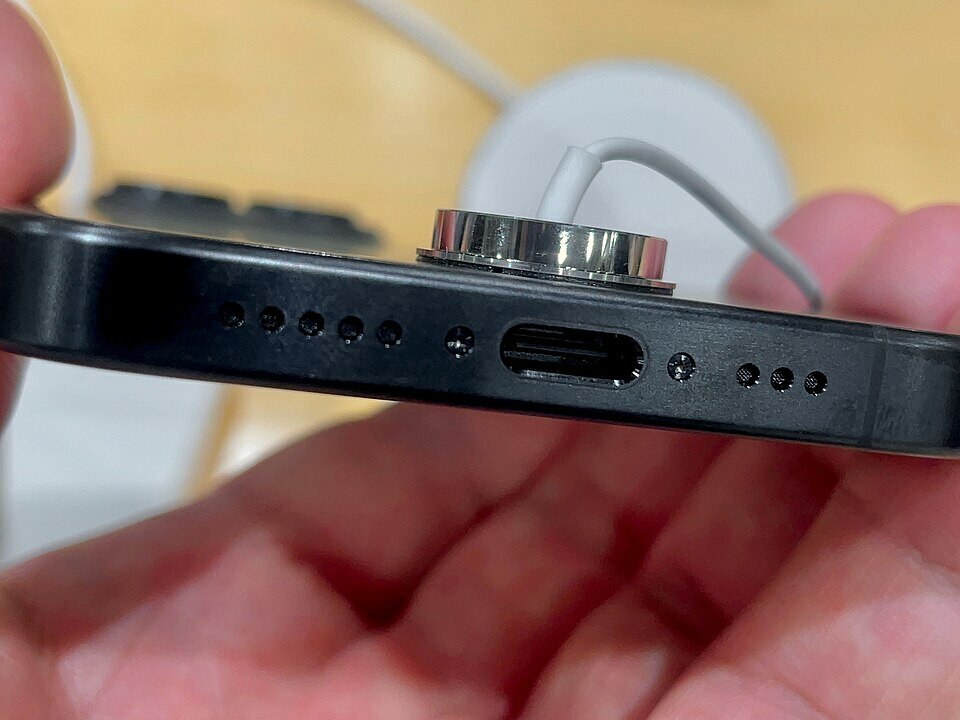
When Apple finally ditched the Lightning connector in favor of USB-C with the iPhone 15, it wasn't exactly a voluntary decision. The European Union passed its Common Charger Directive in 2022, requiring all small and medium portable electronic devices sold in Europe to use USB-C by the end of 2024. Apple had been resisting the switch for years — even as their iPads and MacBooks had already made the move. Lightning was proprietary, and that meant Apple controlled the accessory ecosystem and the licensing revenue that came with it. Once the EU mandate was locked in, Apple faced a simple choice: build a Europe-only USB-C iPhone, or just switch everywhere. They switched everywhere. Which means American iPhone users got a better port because of a law passed in Brussels that most of us have never heard of.
Personally, I'd have gone further. If I had my way, every portable digital device — laptops included — would be required to use USB-C. No more proprietary power bricks, no more hunting down a specific adapter because the manufacturer decided their port needed to be unique. A broken laptop charger should be as easy to replace as walking into any store and grabbing a cable off the shelf. We're not quite there yet, but the EU's move was a step in the right direction, and I hope the rest of the industry keeps following.
With the recent iPhone 16e, the transition is now complete. Every current iPhone runs USB-C. And yet, if you watch most people interact with that little oval port, they plug in a charger and that's it. As someone who spends a lot of time helping people get more out of their technology, that's a little like buying a Swiss Army knife and only ever using the blade.
Here's what else is in there. Your iPhone can now push power out through the USB-C port — up to 4.5 watts — enough to charge your AirPods, your Apple Watch, or even a friend's Android phone in a pinch. Just plug a USB-C cable from your iPhone to the other device. It won't win any speed records, but when someone's phone is about to die at dinner, it's a genuinely useful trick to have.
Storage is another one. We've all seen the dreaded "Storage Almost Full" notification. iCloud is one answer, but not everyone wants their files floating in the cloud — and I hear that concern from customers regularly. The good news is that you can plug in a USB-C flash drive and your iPhone will read it natively through the Files app. Move photos, videos, and documents right off the phone, no computer required. If you're on an iPhone 15 Pro or 16 Pro, you can take this even further, recording ProRes video directly to an external drive while you shoot — which is genuinely impressive for anyone doing serious video work.
The big-screen iPhone models are also capable of handling real productivity. If you find yourself doing more typing than you'd like on glass, a USB-C keyboard plugs right in and iOS handles it natively, no setup required. On the audio side, a dedicated USB-C microphone is a noticeable upgrade over the built-in mic — especially if you're recording video, doing interviews, or jumping on calls where clarity matters. It's a small investment that makes a meaningful difference.
Photographers will appreciate the SD card angle. A USB-C card reader connects directly to your iPhone, pulling photos off your camera faster and more reliably than most wireless companion apps. Apple makes one that also works with your Mac or iPad, so it's a genuinely versatile accessory to keep in your bag. And if you ever find yourself in a hotel room where the TV is locked down or AirPlay isn't cooperating, a USB-C to HDMI adapter lets you mirror your iPhone screen directly to any television — old school, but reliable.
Gaming is worth mentioning, too. The latest iPhone Pro models run titles that would have required a dedicated console not long ago, and a wired USB-C controller reduces input lag compared to Bluetooth. For anyone doing heavy internet use — video calls, large file transfers, or just dealing with an unreliable router — a USB-C to Ethernet adapter gives your iPhone a direct wired connection. It sounds excessive until the moment you actually need it.
And if the single-port limitation bothers you, a USB-C hub solves it entirely. A good seven-in-one adapter adds a headphone jack, HDMI out, an SD card slot, Ethernet, and a few extra USB ports. It's not something you'd carry everywhere, but if you're setting up to do real work from your phone, it turns that one port into a full workstation connection.
The shift from Lightning to USB-C was mostly treated as an inconvenience when it happened — "now I need new cables." But the real story is capability. Your iPhone can now do things with wired accessories that simply weren't possible before, and most USB-C accessories you already use with your Mac or iPad will work with your iPhone too, no adapters needed. One port, and a lot of potential that most people haven't touched yet — courtesy, in no small part, of a regulation passed across the Atlantic.


Comments
No comments on this item Please log in to comment by clicking here